As students and the various stakeholders become more digitally expectant, the impact that technology has on teaching and learning will continue to increase (Howell, 2012, p. 62). Whilst students expect learning activities to involve the use of digital technology, not all students will be able to access or have the same levels of understanding of the various digital technologies. Students living in rural areas or from low socio-economic backgrounds will have less access to technology at home or in school compared to middle and upper-class students (Howell, 2012, p. 57).

Currently, one in five Australians are digitally excluded, and cannot access affordable and reliable broadband (Bentley, 2014). According to the National Assessment Program information and communications technology literacy report, only 55% of year six students met the proficient standard of ICT literacy (Educ 1015 Teaching & Learning in the digital world, n.d).
Digital technology has had a big impact on the nature of teaching and learning in the classroom. The Australian Curriculum Assessment and Reporting Authority {ACARA}, 2014) outlines the use of digital technologies for students to develop and use sophisticated computational thinking skills, processes, techniques, and digital systems to address specific problems and needs. Educators now prepare lessons, provide information, and communicate electronically (Howell, 2012, pp. 63-64). Educators need to have a good understanding of a wide variety of digital teaching tools such as whiteboards, ebooks, laptops, internet, blogs, apps, and computers for classroom learning activities.

Students who are not digitally fluent and have limited access to digital technologies will most likely be unmotivated and disengaged in classroom learning activities. This will have a major impact on the student’s educational outcomes, lifelong learning, and future employment opportunities. Educators, therefore, need to be aware of the digital divide and develop a digital pedagogy that can cater for the different skills and abilities of all their students.
References
Australian Curriculum and Assessment Reporting Authority. (2014). Foundation to year 10 curriculum: Digital technologies. Retrieved 12 April 2018, from https://www.australiancurriculum.edu.au/f-10-curriculum/technologies /digital-technologies/structure/
Bentley, P. (2014). Bridging the digital divide. ABC News. Retrieved 12 April 2018, from http://www.abc.net.au/news/2014-07-02/bridging-the-digital-divide/5566644
Educ 1015 Teaching and learning in the digital world. Retrieved from https://padlet.com/giselle_mafa/53a6zba0juyw
Howell, J. (2012). Teaching with ICT: Digital pedagogies for collaboration and creativity. South Melbourne, VIC: Oxford University Press.
Images
Bing images. (2018). Bing.com. Retrieved 16 April 2018, from https://www.bing.com/images/search? q=pictures+of+digital+divide&qpvt=pictures +of+digital+divide&FORM=IGRE
Bing images. (2018). Bing.com. Retrieved 14 April 2018, from https://www.bing.com/images/search?q=pictures+of+digital+divide&qpvt= pictures+of+digit al+divide&FORM=IGRE
The Digital Divide: Impact on Education. (2018). YouTube. Retrieved 16 April 2018, from https://www.youtube.com/watch?v=ounC6NHCu0k
Digital Fluency
Digital fluency could be defined as a student’s capability and confidence in using technology to achieve desired learning outcomes. A digitally fluent student would know when to use specific digital technologies and why these tools are most effective in classroom learning activities (Makice’s, 2018).
As explained by Howell (2012 p. 133) students starting primary school are described as technological neophytes, where they only have the basic skills and understanding of certain technologies. Educators are therefore responsible for consolidating, refining, and building on these basic skills and exposing students to a variety of learning technologies to help enhance digital fluency (Howell, 2012, pp. 133-134). Allowing students to become digital content creators where they can engage in inquiry-based learning and independent problem solving is an effective teaching method educators can use in the classroom.

Educators can then build on the students prior skills using a variety of technologies linked to the Australian curriculum with established learning outcomes. The learning goals as stated in the (Australian Curriculum Assesment and Reporting Authority {ACARA}, 2014) is for students to develop the skills and understanding to design, create, manage and evaluate innovative digital solutions to meet current and future needs. Being digitally fluent will help students become meaningful members of society, obtain employment, manage finances, and become lifelong learners (Spencer, 2015). As society continues to become more reliant on digital technologies, educators need to develop a digital pedagogy that will meet the needs and expectations of students and the various stakeholders.
The video below explains the importance of digital fluency for lifelong learning and employment.
References
Australian Curriculum and Assessment Reporting Authority. (2014). Foundation to year 10 curriculum: Digital technologies. Retrieved 12 April 2018, from https://www.australiancurriculum.edu.au/f-10-curriculum technologies /digital-technologies/structure/
Henderson, M., & Romeo, G. (2015). Teaching and digital technologies: Big issues and critical questions. Melbourne: Cambridge University Press.
Howell, J. (2012). Teaching with ICT: Digital pedagogies for collaboration and creativity. South Melbourne, VIC: Oxford University Press.
Makice’s, K. (2018). Digital Fluency. Pinterest. Retrieved 13 April 2018, from https://www.pinterest.com.au/kmakice/digital-fluency/
Spencer, K. (2015). What is digital fluency. Core Education. Retrieved from https://karenmelhuishspencer.com/2015/10/30/what-is-digital-fluency/
Images
Images of digital fluency – Bing images. Retrieved from https://www.bing.com/images/search? q=images+of+digital+fluency&qs=n&form =QBIRMH&sp=1&pq=images+of+digital+fluency&sc=0&sk=&cvid=7CBCCA08 7C0740E180D0E4C42874E5E3
Digital Classrooms. (2018). Pinterest. Retrieved 14 April 2018, from https://www.pinterest.com.au/pin/435582595183783551/
Digital fluency. (2018). YouTube. Retrieved 17 April 2018, from https://www.youtube.com/watch?v=lglIKLPkMqk
Digital Identities and security
Our digital identity or tattoo is the permanent collection of data about an individual that can be seen online. As people continue to acquire information and communicate online their digital identity becomes more detailed. Our digital identity can include social media, emails and website applications. Every time we tweet, blog, send emails, or post pictures online we are adding to our digital identity. Our digital identity is permanent, the photos you post, comments you write and information you share. Who is reading this information? Who is storing this information? What are they doing with this information? Will this impact our future? What does it say to future employers?
 Primary school students can be referred to as
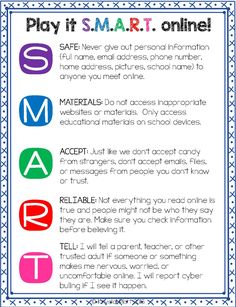
Educators need to teach students the importance of protecting their identity and personal information online. Developing safe online practices in the classroom, explaining how digital technology can be used to protect privacy, and working with parents to ensure safe online practices at home (Hughes & Burke, 2014). Educators need to empower students with the knowledge of how their online identity is first created and then developed, so they can choose how it evolves. How can students protect their digital security? Set your profile to private, different and secure passwords, limit personal information, update software regularly to check for viruses (Sammos & Cross, 2017, pp.41-42,60,125).

References
Australian Curriculum and Assessment Reporting Authority. (2014). Foundation to year 10 curriculum: Digital technologies. Retrieved 12 April 2018, from https://www.australiancurriculum.edu.au/f-10-curriculum/technologies /digital-technologies/structure/
Howell, J. (2012). Teaching with ICT: Digital pedagogies for collaboration and creativity. South Melbourne, VIC: Oxford University Press.
Hughes, J., & Burke, A. (2014). The digital principal: How to encourage a technology-rich learning environment that meets the needs of teachers and students. Ontario: Pembroke.
Sammons, J., & Cross, M. (2017). The basics of cyber safety: Computer and mobile device safety made easy. Massachusetts: Elsevier.
Warburton, S., & Hatzipanagos, S. (2013). Digital identity and social media. Hershey, Pa.
Images
Trend Micro Offers Protection for Your Social Networks [INFOGRAPHIC]. (2018).Pinterest. Retrieved 17 April 2018, from https://www.pinterest.com.au/pin/66428163226530464/
Library & Tech sites. (2018). Pinterest. Retrieved 17 April 2018, from https://www.pinterest.com.au/pin/185843922096223830/
How to Protect Yourself Against Identity Theft Online. (2018). Pinterest. Retrieved 18 April 2018, from https://www.pinterest.com.au/pin/333196072412684419/
Teaching with Digital Technologies. (2018). Pinterest. Retrieved 18 April 2018, from https://www.pinterest.com.au/pin/365847169717132563/
A Great Guide on Teaching Students about Digital Footprint. (2018). Pinterest. Retrieved 18 April 2018, from https://www.pinterest.com.au/pin/432204895460961197/
Reflection
Through the completion of this assessment, I have gained a deeper understanding of why the teaching and learning of digital technology play such a crucial role in the educational outcomes experienced by all students. I can understand why digital learning is now replacing traditional forms of classroom teaching, in order to meet the demands and expectations of digitally expectant students and the various stakeholders. Being unfamiliar with the various technological tools required to complete this assignment, I now understand the importance of the digital divide and that not all students will be digital natives. I appreciate the importance of the various teaching methods and tools that educators use in learning activities that can cater for the various levels of skills and abilities found in the classroom.
I would describe myself as a technological neophyte with only the basic level of skill and understanding in the use of digital technology (Howell, 2012, p. 133). My digital fluency, however, has improved after completing this assessment as I have built upon my prior skills and understanding by engaging in a variety of different technological tools. Using a variety of technological tools in this assessment that would most likely be found in the classroom (wordpress, soundcloud and powtoon) has helped improve my digital pedagogy (Howell, 2012, p. 119). I now have more confidence in not only understanding how to use these digital tools but also why these digital tools can be so effective for teaching and learning (Howell, 2012, p. 7). I can appreciate why digital technologies can be used so effectively to engage and motivate students and equip them with the skills needed for positive learning outcomes (Howell, 2012, p. 62). I felt a sense of digital pressure as I have never previously used any of these technological tools previously. By developing an attitude and aptitude of engaging in a variety of new technological tools for this assessment, I have gained a deeper understanding of how they could be used meaningfully in an educational context (Howell, 2012, p. 9).
Howell, J. (2012). Teaching with ICT: Digital pedagogies for collaboration and creativity. South Melbourne, VIC: Oxford University Press.

